Git commmit style guide
Table Of contents
Tense
Use the imperative, present tense: “change” not “changed” nor “changes”. Think of If applied, this commit will....
Line size
You should limit your subject line size to 50 characters or 72 maximum. Keeping subject lines at this length ensures that they are readable, and forces the author to think for a moment about the most concise way to explain what’s going on. The body should be wrapped at about 72 characters.
A commit with a long subject line wraps and elipses if it’s too long:

If you hover on it, you will see that it was written in one line:

In git log it’s also just one line:

And compare it to a good written commit message:
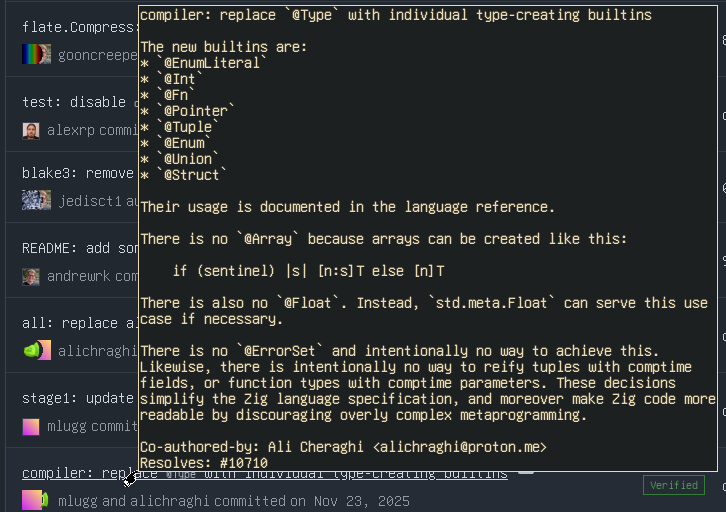
Much easier to read right?
How to measure line size?
You can ether use an editor, or Git hooks. With Git hooks you can configure what actions will be done after certain Git operations, for example, you can make your commit message get automatically wrap at 72-character line length. Git hooks will not be discussed further here.
Instead of typing git commit -m "<Your commit message>", you can just type git commit, which will open editor you set with git config core.editor <editor> for editing the commit message. For example, I use Helix and it automatically shows 50 and 72-character guides. For me it looks like this:
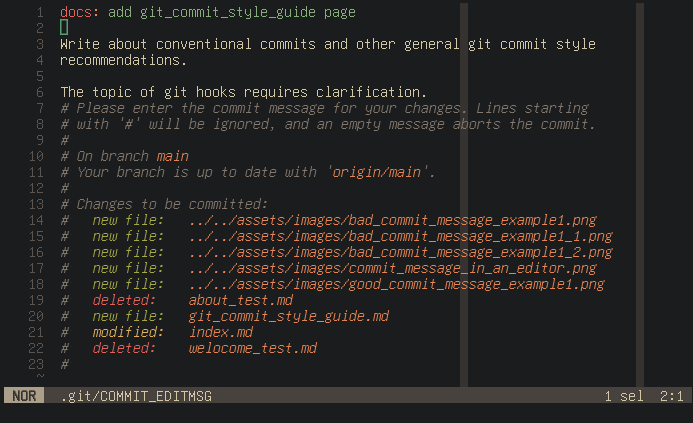
Your favourite editor may not show you there you should wrap the line, but I’m sure it does display current cursor position on the line, so you’ll be fine.
Conventional commits
The Conventional Commits specification is a lightweight convention on top of commit messages. It provides an easy set of rules for creating an explicit commit history, which makes it easier to write automated tools on top of.
Commit messages must be structured as follows:
<type>(<optional scope>): <description>
empty line as separator
<optional body>
empty line as separator
<optional footer>
Subject line
Subject line briefly explains the change.
Types
featCommits that add, adjust or remove a feature /Cebola-devdocs/m the API or UIfixCommits that fix an API or UI bug of a precededfeatcommitrefactorCommits that rewrite or restructure code without altering API or UI behaviorperfCommits are special type ofrefactorcommits that specifically improve performance
docsCommits that exclusively affect documentationtestCommits that add missing tests or correct existing onesclCommits that affec deployment scripts, CI/CD pipelines, backups, monitoring, or recovery procedureschoreCommits that represent tasks like initial commit, modifying .gitignore, version change and etc.
Depending on the project and its specific modules, there might be more types added, for example db (database related changes), or build (project build related process), but most of the time existing type with a scope is enough to specify what exact type of change a commit makes.
If you can’t decide one type for your commit, that means you’re commiting too much at once. Do
git add <file ...>andgit commitas many times as you need to keep everything pretty and clean.
Scopes
The scope provides additional contextual information.
- The scope is an optional part
- Different repos and projects can have different scopes
When you make a change, you can usually specify the scope - for example feat(admin) (admin-related feature), feat(navigation) (navigation-related feature), fix(render) (render-related bug fix), etc.
Breaking changes indicator
This indicator signals that the changes may disrupt existing functionality or workflow for users or other developers.
- A commit that introduce breaking changes must be indicated by an ! before the : in the subject line e.g.
feat(api)!: remove status endpoint - Breaking changes should be described in the commit footer section, if the commit description isn’t sufficiently informative like this
BREAKING CHANGE: drop windows support.
Examples of breaking changes: changing a function name, or a return type, or input parameters, removing an API endpoint, droping platform support, changing a default behavior.
Description
The description contains a concise description of the change.
- The description is mandatory
- Do not capitalize the first letter
- Do not end the description with a period (.)
- In case if you can specifiy the scope also see scopes
- In case of breaking changes also see breaking changes indicator
Body
The body should include the further description of the change and motivation for the change and contrast this with previous behavior if necessary.
- The body is an optional part
- Here you can use unordered (- or *) and ordered (1. 2. 3. …) lists
Sometimes you don’t need to add body if description is self explanatory, for example docs: fix typo, or chore(cl): update actions' versions to match the latest, or refactor!: change 'request()' function name to 'sendRequest()' and etc.
Footer
The footer should contain issue references and informations about breaking changes if needed.
- The footer is an optional part
- Optionally reference issue identifiers (e.g., Resolves: #123, See also: #456, #789)
- Breaking Changes must start with the words BREAKING CHANGE:
Examples
compiler: replace @Type with individual type-creating builtins

The new builtins are:
* `@EnumLiteral`
* `@Int`
* `@Fn`
* `@Pointer`
* `@Tuple`
* `@Enum`
* `@Union`
* `@Struct`

Their usage is documented in the language reference.
There is no `@Array` because arrays can be created like this:

    if (sentinel) |s| [n:s]T else [n]T

There is also no `@Float`. Instead, `std.meta.Float` can serve this use
case if necessary.

There is no `@ErrorSet` and intentionally no way to achieve this.
Likewise, there is intentionally no way to reify tuples with comptime
fields, or function types with comptime parameters. These decisions
simplify the Zig language specification, and moreover make Zig code more
readable by discouraging overly complex metaprogramming.

Co-authored-by: Ali Cheraghi <alichraghi@proton.me>
Resolves: #10710
fix: pan with middle mouse button in zoom != 1.0 (#532)

When dragging with a zoom != 1.0 the pixel where dragging started
does not stay under the mouse pointer as the event.pos used for the
pan is in image coordinates.

Thus add a new event.screen_pos to the MouseEventMsg and keep
event.pos which is transformed to image coordinates for tool in
handle_event_mouse_input().
chore: adjust dependabot config

This is an attempt to reduce the noise.

Closes: #280
References
I heavily relied on these references and copied a lot from them. I strongly recommend to check those out.