Issues
Table Of contents
Title and tense
For those recommendations visit this page.
Description
Description contains a concise description of an issue.
- For issues with sub-issues, you must summarise everything you need to do to close them all
- For a complex issue that require several tasks, enumerate each task in a numbered list
- If you can’t write a description that fully describes what needs to be done and how, then add the
questionlable
Project fields
Priority
Priority ranges from highest(P0) to lowest (P4).
- P0 - usually bugs and other security-sensitive issues that must be fixed as quickly as possible
- P1 - usually issues that block other issues that must be done so you can continue other tasks; usually architecture related
- P2 - normal priority tasks
- P3 - less important tasks
- P4 - low-priority tasks that can wait
Size
Size usually depends on the scale and complexity of the project. For example, in some projects XL issues can be done in 2 days, while in the other in 2 weeks. That’s up to you to choose the best size for the issue. Size ranges from super large (XL) to super small (XS).
Estimate
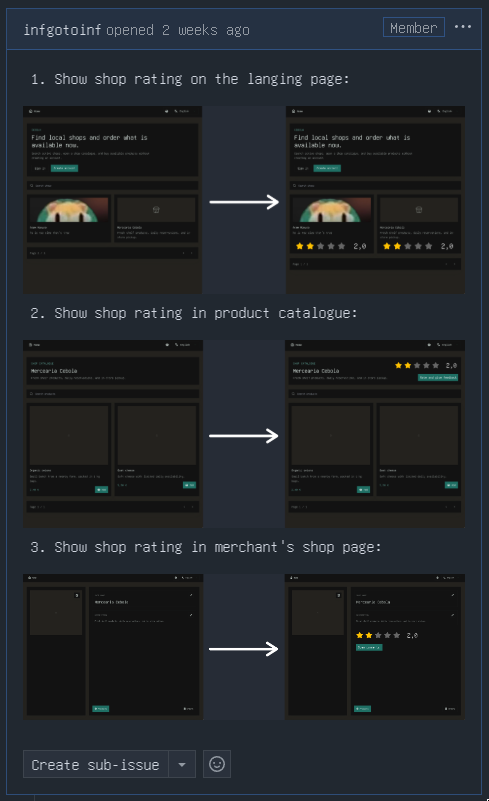
An estimate is the ammount of tasks required. One big task - estimate of 1, one small task - estimate of 1, five tasks in one issue - estimate of 5.
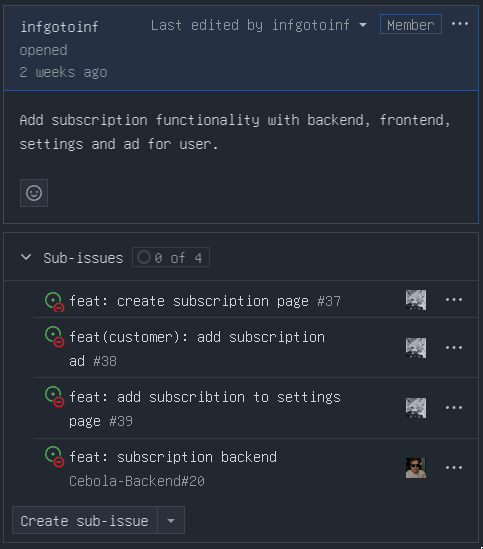
- Parent issues that just tie together and summarise their sub-issues, but that contain no specific tasks, should have an estimate of 0
Example of an issue with esimate of 3:
Example of an issue with estimate of 0 (just summarises sub-issues):
Relationships
Relationships define connections between an issue with other issues: parrent, child, blocked by, or blocking. You must use them whenever you can, because they make work much easier.
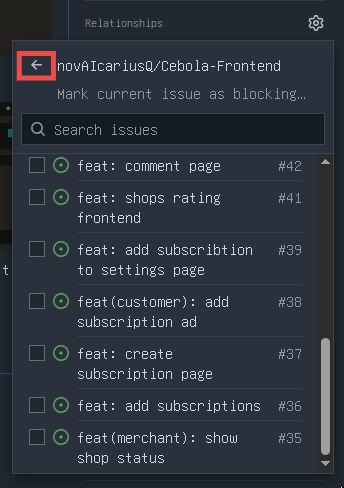
To choose different repository for a relationship, click the back arrow in the window:
Blocked by/Blocking
If you can’t work on an issue while some other issue isn’t closed, mark it as blocked by that issue.
Child/Parent
- If you have a complex issue that requires multiple different changes, create sub-issues for that issue
- If one task requires changes across different repositories, create sub-issues of this issue in the respective repositories
Additional information
If you start working on an issue, move it to the “In progress” column in the project and assign it to yourself.