Usefull tools
Table Of contents
Github CLI
Github CLI is a very useful tool that lets you perform Github-related actions right from your terminal. Examples of what github-cli can do:
- Copying labels from one repo to another:
gh label clone https://github.com/infgotoinf/BT - Creating a pull request:
gh pr create - Creating a repository:
gh repo create
It also has many useful plugins, such as gh-dash (for managing pull requests and issues via TUI) and gh-markdown-preview.
Extended Markdown
Mermaid
Mermaid is a tool for creating diagrams from simple code. It’s integrated into Github-flavored Markdown (the dialect of Markdown that Github uses) and is a good, easy-to-edit way to visualize structures, databases, tables, and other information.
Example of using Mermaid in Github issue:
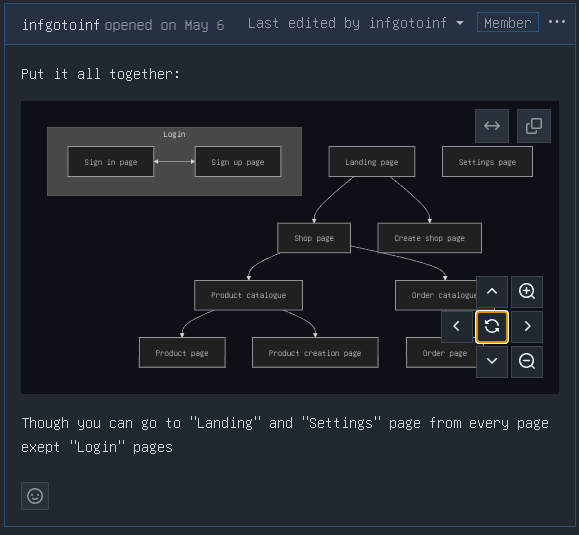
The code of example:
```mermaid
flowchart TB
  subgraph Login
    direction LR
    id01["Sign in page"] <--> id02
    id02["Sign up page"]
  end
  id1["Landing page"] --> id2
  id1 --> id22["Create shop page"]
  id2["Shop page"] --> id3
  id3["Product catalogue"] --> id4
  id3 --> id41
  id41["Product creation page"]
  id4["Product page"]
  id2 --> id5
  id5["Order catalogue"] --> id6
  id6["Order page"]

  a["Settings page"]
```
Mermaid has a very vast documentation and it’s very simple, so you’ll have no problems learning it.
Images
Of course you know that you can add images to Markdown, I just want you to use this Markdown functionality, because of how usefull it is and how much you can show and explain with images:
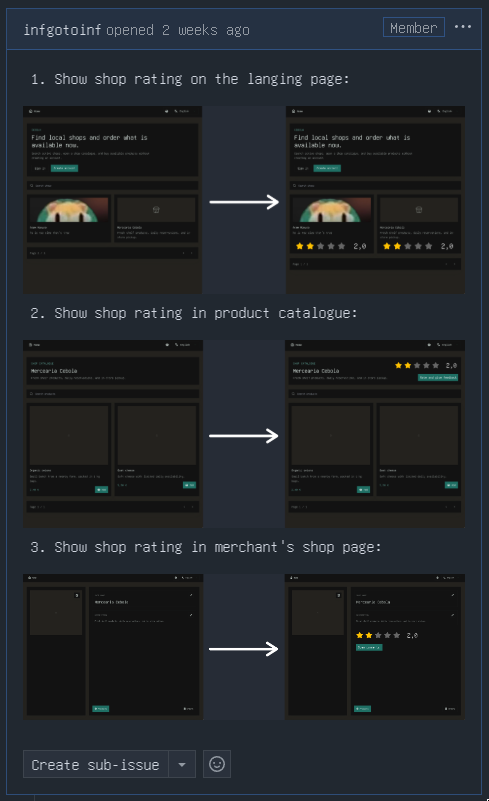
For something simple you can just take screenshots, for more complex things use whatever graphical editor you’d like. I use Krita, you can think of it as a sorta FOSS Photoshop and a drawing app, but it can be kinda heavy for something simple. For in-browser solution I’d recommend something like Pixlr, it’s pretty featureful and don’t require registration.